Expert How to create selling highlights for business: structure, content and step-by-step configuration

It is easier for a person to form an idea of the company through specific facts and situations.
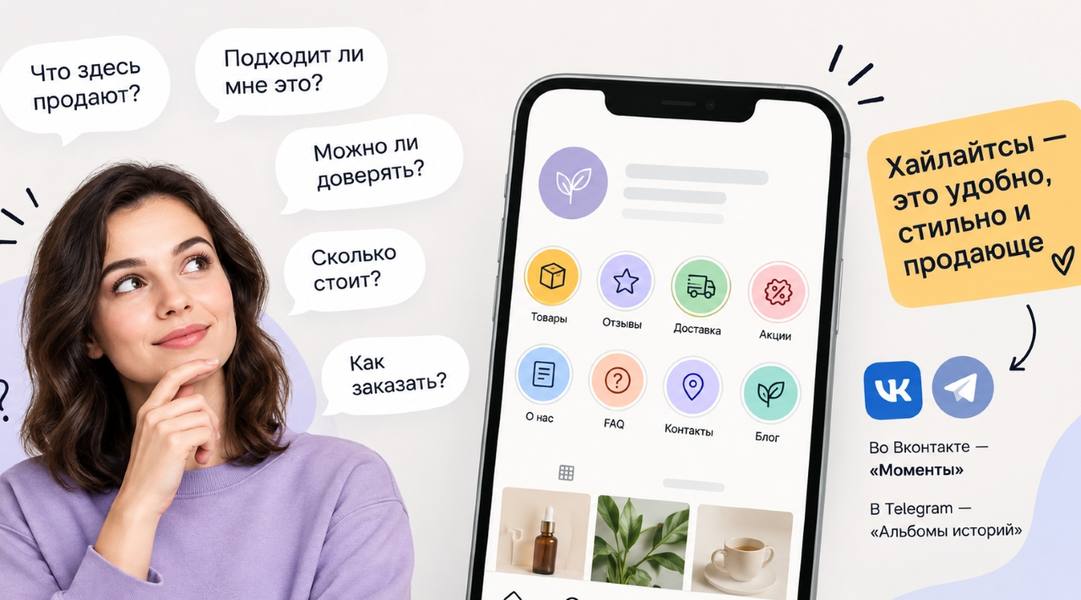
When a person first enters the social network of a business, he usually has a few simple questions: What are they selling here? Is that right for me? Can I be trusted? How much is it? How do I order?
If you have to search for answers from dozens of publications, some people just close the page. Therefore, there is such a tool as highlights, which help to collect key information in one place. They can be called in different ways: in Vkontakte they are “Moments”, in Telegram – “Albums of Stories”.
With a competent structure, highlights can serve as an understandable navigation: a person can quickly get acquainted with the business, see the proposal, study the results of work and move to the appeal.
Why Businesses Need Highlights
Highlights solve several tasks at the same time.
- They're in business.
A new subscriber can understand in a few stories what the company does, who works with customers and for whom the services are intended. - They're showing a sentence.
In a separate section, you can collect services, goods, work formats, prices and conditions. - Ask questions before buying.
The client does not have to write to the manager to find out the obvious things: the timing, process, payment options or the composition of the service. - Confirm competence.
Cases, reviews, results, photos of projects and the workflow give a person reason to trust the company. - They help you take the next step.
At the end of the desired section, a person should understand what to do next: write a message, leave a request, go to the site, sign up or receive free material.
At the same time, each hilights needs a specific task. If the same section contains services, photos from the corporate party, reviews and photos of the team, it is more difficult for a person to understand why to open it.
How to Design a Highlights Structure
Imagine the person who opened your page for the first time. What do you need to know to make a purchase decision?
Usually the sequence is something like this:
- What kind of company is this?
- What does it suggest?
- Who is suitable for the offer;
- What results can be obtained;
- Why can we trust?
- How the work goes;
- How much does it cost?
- How to place an order.
On the basis of these issues, a structure is formed.
Basic set
For most business accounts, I would start with four sections:
Company.
Acquaintance with business, specialists, approach and experience.
Services / Goods
Details of the proposal.
Cases/Reviews
Results and confirmations of work.
How to order / How to buy
It's a clear scenario.
After that, the sections that a particular business needs are added: prices, work process, team, answers to questions, before / after, shares, lead magnet and others.
The number of highlights does not need to be increased for the sake of quantity. Better a few well-filled sections that really help make a decision.
What to Post in Every Highlights
1. About the Company.
This section is for someone who doesn’t know anything about you yet.
Tell me:
- What does the company or specialist do?
- what goods or services it offers;
- What clients do you work with?
- What tasks helps to solve;
- What city or format does it operate in?
- who is on the team;
- How long has the business been operating?
- What is the experience?
- which projects have already been implemented;
- What facts confirm the examination.
It is not necessary to turn this section into an official presentation.
For example, instead of a few stories with the text “We are a dynamically developing company that values each client”, you can show the real story: how the business came into being, what kind of request customers most often address, what project the team especially remembered.
It is easier for a person to form an idea of the company through specific facts and situations.
2. “Services” or “Goods”
This is one of the most important sections.
Here, a person should quickly figure out what exactly he can buy from you.
For each service or product category, answer the following questions:
- What do you suggest?
- to whom it suits;
- What problem does it solve?
- what is included in the proposal;
- How the work goes;
- How long does it take?
- How much is it?
- What does the cost depend on?
- What are the options?
- What you need to do to order.
If you have many services, it is better to divide them into understandable groups.
For example, a promotion agency may have separate areas: maintaining social networks, developing a content system, auditing, consulting.
Do not put ten different sentences in one long highlight. Each section should be easy to view.
3. Cases and reviews
Simply posting screenshots of reviews is not enough.
A good case helps a person understand what result he can get from working with you.
For each case, you can disclose:
- Who's the client?
- What task did he come with?
- What was the situation at the beginning?
- What had to be changed?
- What did you do?
- What decisions have been made;
- What happened?
- What indicators or changes have been achieved;
- What the client said after work.
For example, for a massage studio, you can show the client’s original task, work program, process and result. For a promotion specialist – the status of the account before work, the changes made and the dynamics of indicators.
Reviews are better placed next to the context. When a person understands what task the client was solving, the review is perceived much more meaningful.
4. "How the Work Goes."
This section is especially useful for services that require several steps.
Tell me:
- What happens after treatment;
- What questions do you ask?
- How you define the task;
- What happens in the first phase?
- how many stages the work involves;
- what the customer receives;
- How long does the process take?
- how the agreement is made;
- When the client gets the result.
You can show the real work: fragments of the project, preparation of materials, meetings, correspondence, production, shooting, design.
A person understands in advance what awaits him after the application, and it is easier for him to make a decision about the application.
5. "Questions"
It is necessary to collect real customer questions.
For example:
- Is it possible to order only one service;
- how long the work lasts;
- Can I work remotely?
- what needs to be prepared;
- how payment is made;
- Can the composition of the service be changed?
- whether there is an urgent implementation;
- What to do if the customer does not know what service they need
- when you can expect results.
But turning this section into a dry directory is not necessary. If the question is important, it can be solved through a short story.
You can tell the story of a client who came without ready-made content: where they started, what they prepared, how they organized the work and what result they got.
This is how a potential client gets an answer and at the same time sees your approach to work.
6. Team.
If a customer buys a service from a company, it is useful for them to understand who will do the work.
We can show you:
- specialists;
- their roles;
- experience;
- areas of responsibility;
- work processes;
- real pieces of work.
A few facts are sufficient for each employee. It is not necessary to make a full biography.
Photos from the workflow, short videos and comments of specialists about their part of the work work work work work well.
7. "Before/After"
This format is especially useful for areas where changes can be shown visually or in numbers.
In one example, tell us:
- What was the initial situation?
- What task did the client come with?
- what has been done;
- What decisions have been made;
- What did you get?
For a design studio, this can be a room before and after a project.
For SMM-agency – account indicators, content structure and changes after work.
For the photographer – the initial task and the finished series.
For the stylist - the original wardrobe and collected images.
The more specific the initial situation and the result, the more useful this section is for a potential client.
8. "Prices"
If the price can be called in advance, it is better to make it available for viewing.
Besides the price, explain:
- What is included in the price;
- What are the options?
- on what the total amount depends;
- that is paid separately;
- Is there a minimum order available?
- How long does the work take?
- What the customer gets for that amount.
If the cost is calculated individually, show some examples.
For example:
Project 1: The client’s task is the cost.
Project 2: Another task – another amount of work – cost.
This way people understand the logic of price formation better.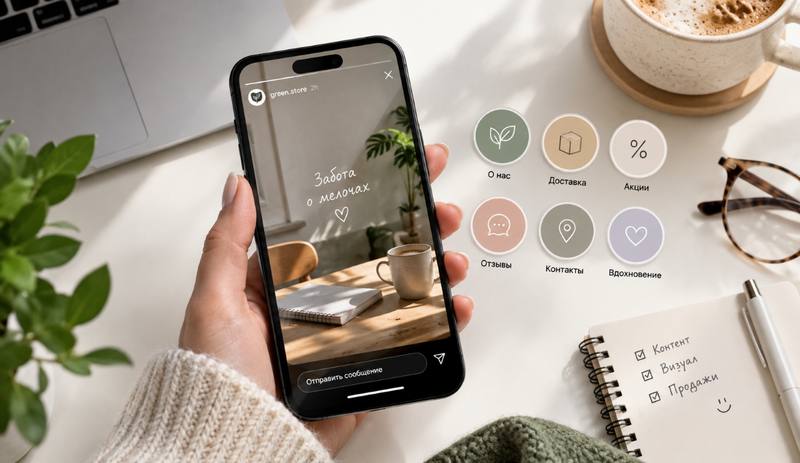
How to use storytelling in highlights
One of the frequent problems is trying to fill the highlights only with information stories.
It's like,
We've been working since 2018.
We use quality materials.
Individual approach.
We guarantee high quality.
Such statements give little to a potential client. It is much more interesting to show a specific situation.
For example:
“A client came to us who had been unable to decide on the design of the apartment for three months. At the first meeting, it turned out that he already had 20 saved references, but they were all from different styles. We started with...
Then you can show what the specialists did, what decisions they made and what the result was.
For a short story, it is convenient to use seven elements:
- The situation is what happened.
- Context - who the client is and with what task came.
- The problem is what prevented you from getting the desired result.
- The solution is what you suggested.
- The process is what we did.
- The result is what has changed.
- The next step is what to do to someone with a similar task.
One story may well take 5-7 stories. No need to increase the volume for the sake of quantity.
How to make highlights in Vkontakte
In Vkontakte, this format is called “Moments”.
Before creating, prepare the stories themselves: define the titles of the sections, the order of the stories and the covers.
Next:
- Open the VK community.
- Post relevant stories on behalf of the community.
- Go to managing published stories.
- Create a new moment.
- Select the stories that should be included in this section.
- Give me a clear name.
- Add the cover.
- Check the order of the stories.
- Save the section and check how it looks from the subscriber side.
- As new content emerges, update your Moments.
Names should be made short and clear: “Services”, “Reviews”, “Prices”, “Team”, “How to order”.
A person should understand the content of the section before opening.
How to Create a Story Album on Telegram
In Telegram, saved collections of stories can be combined into albums.
Before creating, also define the structure. For example:
About us / Services / Cases / Reviews / Prices / How to order.
Next:
- Post stories on the channel.
- Open the channel profile and the story section.
- Move on to making an album.
- Choose the stories you want to combine.
- Give the album a clear title.
- If necessary, change the order of the stories.
- Save the album.
- Check how it appears in the channel profile.
- Add new stories to the relevant album as you publish.
Here it is especially important to monitor the relevance. If there’s a two-year-old price left in the album, that section starts to work against business.
Mistakes that reduce the effectiveness of highlights
Too many sections.
When a business has 15-20 highlights, it is difficult for a person to choose where to click.
Leave only those topics that really help to understand the proposal and make a decision.
Misunderstood names
“Useful”, “Different”, “Our”, “Interesting” say almost nothing about the content.
The name should explain what the person sees inside.
Information without evidence
“We work qualitatively”, “we have a professional team”, “use an individual approach” – these are statements.
Add confirmations: real projects, figures, reviews, photos of the process, documents, results.
Only reviews without context
The screenshot “Thank you, I liked it!” tells almost nothing about the product.
Add information about the client’s task and show what was done.
No next step.
The person looked at the services, cases and reviews. What do we do next?
At the end of relevant sections should be clear CTA: write, sign up, get advice, go to the site, download material.
Old data
Check prices, services, links, promotions, team composition and working conditions.
Highlights are visible and perceived as relevant information.
Highlights exist for the sake of the Highlights themselves.
You don’t have to create a section just because “everybody has one.”
Each Highlights should answer a specific customer question or help them take the next step.
Checklist before publication
Open your business page and check:
- Do you understand in a few seconds what you are doing?
- Can goods or services be found quickly?
- Do they know who they are?
- Are there real cases and reviews?
- whether the work process is shown;
- Is it possible to know the price or understand the principle of its formation?
- whether the main issues of customers are closed;
- Know the price or understand the principle of its formation;
- Is there an actual method of communication?
- Do you know what to do after watching?
- Are there any old prices, shares or conditions?
- Are there real stories, examples and evidence in Highlights?
If the answer to most questions is yes, the structure is already doing its job.
Highlights should be seen as part of the packaging of the business. Their task is to quickly give the person the necessary information, show real confirmations and lead to the following action: subscription, message, order or purchase.
Conclusion
Good highlights should not become an archive of old stories. It is a structured part of the page that helps a person understand the business and decide on the next step.
Gather sections around real customer questions, add specific examples, case studies, reviews and show how the work is going. For each highlights, define one task and regularly update the information.
And if you want to systematically deal with business promotion in social networks, content and account packaging, subscribe to my Telegram channel. "Smart SMM."
There, I disassemble working promotion tools, show examples, share templates, checklists and ready-made solutions that can be used in my business.